Balloon Stamp Brush for Procreate Vol.2: Creative Character Building
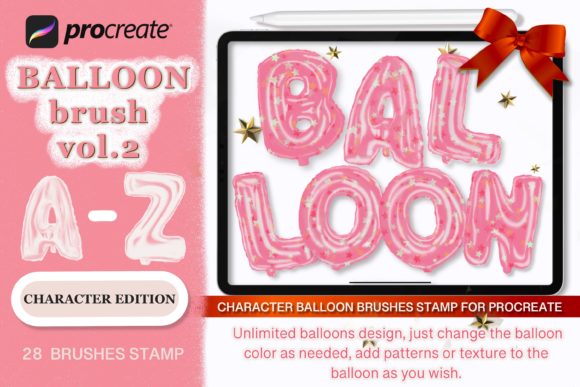
There’s something inherently joyful about balloon art. It captures a sense of celebration, childhood nostalgia, and vibrant energy that few other design elements can match. For digital artists and crafters using the iPad, the Balloon Stamp Brush for Procreate Vol.2 offers a specialized toolkit to bring that festive aesthetic into your work. This isn't just a set of generic shapes; it's a comprehensive system designed to construct 3D character figures and typography, giving your designs a tactile, illustrative quality that stands out in a crowded visual landscape.
The Anatomy of a 3D Balloon Character
When you first open the Balloon Stamp Brush for Procreate Vol.2, you might expect simple oval shapes. However, this volume—especially the character edition—is engineered for construction. The appeal lies in the "stamp" mechanic. Instead of freehand drawing, you are assembling. The brush set includes distinct parts: spherical bodies, elongated limbs, facial features, and accessories. This modular approach allows you to build complex figures without needing advanced illustration skills. The visual style mimics the sheen and curvature of real latex balloons, complete with highlights and shadows that suggest volume. This creates an immediate sense of depth, making the characters pop off the screen.
The personality of these brushes is undeniably playful yet professional. It bridges the gap between a child’s party favor and a polished graphic design asset. The style leans heavily into the "modern typography" and "creative font" space, where the text itself becomes an illustration. It’s a typeface that doesn't just sit on the page; it interacts with the viewer, inviting them to engage with the whimsical form.
Strategic Applications: From Branding to DIY Crafts
Understanding where to deploy the Balloon Stamp Brush for Procreate Vol.2 is key to maximizing its value. While it excels in personal projects, its utility in commercial design is significant.
Digital and Print Marketing
For small business owners and marketers, this brush set is a secret weapon for seasonal campaigns. Consider the visual hierarchy of a "Birthday Sale" social media graphic. Using a standard serif or sans serif font might convey information, but using a balloon-style display font instantly communicates the theme of a party or celebration. It sets the tone immediately. This works exceptionally well for:
- Social Media Graphics: Creating eye-catching Instagram Stories or Facebook ads for event-based businesses like bakeries, party supply stores, or children’s entertainment services.
- Editorial Design: Adding visual interest to magazine layouts or blog headers focused on parenting, lifestyle, or event planning.
- Web Design: Designing unique hero images or call-to-action buttons that require a high-energy visual language.
Physical Products and Home Decor
The versatility of the Balloon Stamp Brush for Procreate Vol.2 extends beyond the screen. Because the output is high-resolution, it translates beautifully to physical media. The "DIY 3D Number Balloon SVG Design Clip Art" aspect is particularly relevant here. Imagine creating a custom "Happy Birthday" banner for a client, where each letter is rendered as a 3D balloon. The texture and lighting baked into the brush strokes reduce the need for complex post-processing.
This makes it ideal for:
- Apparel and Accessories: Designing prints for personalized T-shirts, tote bags, or cups. The bold, blocky nature of balloon letters ensures readability even from a distance.
- Vinyl Decals: Creating wall art or window decals. The defined edges of the stamps make them suitable for vector tracing if you need to cut vinyl.
- Greeting Cards and Invitations: Constructing intricate pop-up style designs for Christmas, Valentine’s Day, or New Year’s cards.
Design Mechanics: Readability and Visual Hierarchy
As a creative professional, you know that style cannot supersede function. The primary challenge with any decorative or display font is readability. The Balloon Stamp Brush for Procreate Vol.2 navigates this by prioritizing bold, distinct silhouettes. While it is not a body copy font (you wouldn't use it for a paragraph of text), it excels as a header or logo design element.
When using this brush set, consider the following design principles:
- Visual Weight: Balloon characters have significant visual weight due to their rounded forms and implied volume. Use this to anchor your composition. Place your balloon typography at the top or center to draw the eye immediately.
- Color Theory: The brush allows you to change colors easily within Procreate. Leverage this to create gradients or rainbow effects that mimic the reflective surface of actual balloons. High-contrast color pairings work best to maintain legibility.
- Spacing (Kerning): Because you are stamping individual parts or characters, you have manual control over spacing. Ensure there is enough air between the letters so the design doesn't feel cluttered. The "3D" effect means the characters cast shadows; overlapping these shadows can create a tangled look if not careful.
Evaluating Project Fit and Font Pairing
Not every project calls for a balloon aesthetic. To use the Balloon Stamp Brush for Procreate Vol.2 effectively, you must evaluate the context. It is best suited for themes involving celebration, childhood, playfulness, or retro-futurism. It might feel out of place in a corporate financial report, but it would be perfect for a toy store’s rebranding.
When it comes to font pairing, contrast is your friend. Since the balloon brush is highly decorative, round, and playful, pair it with a clean, geometric sans serif font for body text. This creates a professional hierarchy where the headline grabs attention and the supporting text provides clear information. Avoid pairing it with other script or handwritten fonts, as this can create visual noise and make the layout difficult to scan.
Practical Usage and Licensing
The workflow for the Balloon Stamp Brush for Procreate Vol.2 is straightforward. Once you download the ZIP archive and install the .brushes file, you simply select the brush, choose your color, and tap the canvas. For character building, you layer the stamps—placing a body, then adding limbs, then the head. This layering capability is what creates the 3D illusion; you can move parts behind or in front of each other to simulate depth.
For designers working on commercial projects, the licensing is a crucial consideration. The inclusion of "All rights reserved" indicates standard usage rights, but it is always best practice to review the specific terms provided by the creator, eDigitalStudio, to ensure your intended use—whether for client work, mass-produced merchandise, or digital templates—aligns with the license. Typically, assets like these are licensed for end-products but not for reselling the brush files themselves.
Ultimately, the Balloon Stamp Brush for Procreate Vol.2