Chain Vector Brushes: Elevate Your Fashion Illustrations
In the world of fashion and jewelry illustration, details make the difference. The way a necklace drapes, how a bracelet catches light, or the intricate links of a vintage chain can bring a design to life. Yet, drawing each link by hand is time-consuming and often inconsistent. This is where Chain Vector Brushes step in as a practical, powerful tool for designers at every level.
What Are Chain Vector Brushes?
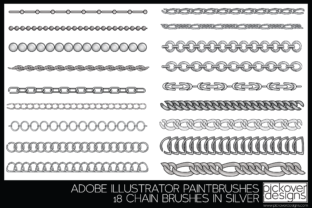
Simply put, Chain Vector Brushes are a set of 18 ready-to-use brush presets designed for vector illustration software. They simulate the look of various chain styles—from delicate, fine links to bold, statement pieces. Each brush is built to adapt to your color choices, meaning you can instantly apply gold, silver, copper, bronze, or any custom tint with a single click. The brushes are scalable, so whether you're working on a tiny earring detail or a large-format poster, the quality remains crisp.
The visual personality of these brushes leans toward realism with a touch of artistic flair. They aren’t overly stylized or cartoonish; instead, they offer a balanced, versatile look that can fit into both classic and contemporary design projects. The included metallic finishes feel authentic, making them ideal for luxury branding, product mockups, or editorial layouts where a premium font or high-end aesthetic is required.
Where Chain Vector Brushes Shine
These brushes are surprisingly versatile. While they’re built for fashion and jewelry illustration, their applications extend much further. Consider using them in:
- Logo design for jewelry brands, fashion labels, or accessory lines. A custom chain detail can add uniqueness to a wordmark or symbol.
- Editorial design for magazines, lookbooks, or blogs. They help create cohesive visual themes across spreads and digital layouts.
- Packaging design for luxury goods, cosmetics, or artisan products. A subtle chain border or accent can elevate perceived value.
- Social media graphics where quick, polished visuals are essential. They work well in Instagram posts, Pinterest pins, or promotional banners.
- Web design as decorative elements, dividers, or background textures for e-commerce sites or portfolio pages.
- Personal projects like invitations, greeting cards, or digital art where you want to add a touch of elegance without starting from scratch.
The brushes integrate seamlessly with other design assets. Pair them with a modern serif font for a timeless feel, or use them alongside a clean sans serif typeface for contemporary contrast. They’re particularly effective when combined with script or handwritten fonts in branding projects, adding a tactile quality that balances fluid typography.
Practical Guidance for Using Chain Vector Brushes
Getting the most out of these brushes is straightforward, but a few practical tips can help you avoid common pitfalls.
Choosing the Right Brush for Your Project
Not every chain style fits every context. A thick, ornate chain might overwhelm a minimalist logo, while a delicate link could get lost in a busy social media graphic. Start by considering the scale and mood of your project. For refined branding, opt for thinner, more uniform chains. For bold, statement pieces, experiment with the heavier, textured brushes.
Testing and Customizing
Because the brushes are vector-based, they’re fully editable. Adjust stroke weight, color, and opacity to match your brand identity or design system. If you’re working with a specific color palette, use the tinting feature to ensure consistency. Always test how the chain renders at different sizes—what looks perfect in a small icon might need adjustment for a large banner.
Font Pairing and Visual Hierarchy
Chain details work best as accents, not competitors to typography. Use them to frame headlines, underline subheadings, or separate content sections without clashing with your chosen typeface. For example, a gold chain brush paired with a classic serif font creates a luxurious, editorial feel. Meanwhile, a silver chain with a geometric sans serif font can feel modern and sleek.
Commercial Use and Licensing
Most premium font and brush assets come with clear licensing terms. Check whether the Chain Vector Brushes license covers commercial use if you’re designing for clients, selling products, or creating marketing materials. Many designers include brushes in client work, but it’s always wise to verify usage rights to avoid legal headaches down the road.
Readability and Performance
While chains are decorative, they should never compromise readability. Avoid placing them directly over body text or critical interface elements. Instead, use them as borders, frames, or background textures. In web design, ensure that any chain elements are optimized for fast loading—vector files are generally lightweight, but complex patterns can still impact performance if overused.
Final Thoughts on Integrating Chain Details
Chain Vector Brushes offer a practical shortcut for adding intricate, professional-looking details to your work. They’re not just for jewelry designers; marketers, bloggers, and small business owners can use them to create cohesive brand visuals, enhance digital content, or add polish to print materials. The key is to use them thoughtfully—as supporting elements that enhance rather than distract.
By treating these brushes as part of your broader design toolkit, you can save time, maintain consistency, and bring a touch of craftsmanship to every project. Whether you’re crafting a luxury brand identity or simply adding flair to a personal blog, these brushes provide a reliable, adaptable solution for creative professionals who value both efficiency and quality.