Procreate Cup Brushes & Stamps: A Cozy Tea Time Toolkit
There is a distinct charm to hand-drawn illustration, especially when it captures the warmth of a familiar ritual. For digital artists working in Procreate, finding assets that provide both texture and character can transform a project from flat to fantastic. This collection, often referred to as CUP BRUSHES and STAMPS for PROCREATE, is designed specifically to bring a cozy, vintage aesthetic to your iPad canvas. It is not merely a set of standard tools; it is a curated environment for creating intricate scenes involving tea, porcelain, and botanical elements.
The Anatomy of a Vintage Aesthetic
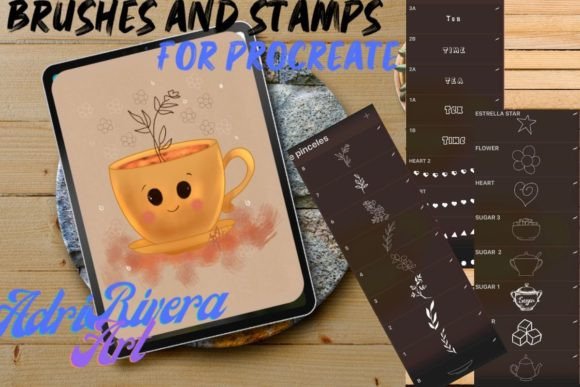
When you open this package, you are greeted with a specific visual personality. The style leans heavily into retro illustration, reminiscent of mid-century greeting cards or storybook pages. The assets include everything from delicate teapots and sugar bowls to whimsical bubbles and garlands. However, the true utility lies in the brushes with textures. Unlike standard digital brushes that lay down flat color, these tools apply grain, paper texture, and shading as you paint. This creates an immediate sense of depth and realism that usually requires hours of post-processing.
The collection is divided into distinct categories to streamline your workflow:
- Illustrative Stamps: These are the heavy lifters of the set. You can use them as traditional brushes to draw continuous lines, or simply touch the canvas once to stamp a complete object, such as a detailed tea cup or a branch of leaves.
- Garland Creators: These brushes are designed to draw repeating patterns of dishes and flowers, perfect for creating borders or frames around text.
- Shading Tools: Specific brushes are included for adding shadow and volume, allowing you to build up light and dark areas naturally.
- Palettes and Canvas: To ensure cohesion, the pack includes a retro color palette and two textured canvas options that mimic the feel of real paper.
Practical Applications for Designers and Creators
Understanding where to deploy these assets is key to maximizing their value. Because the aesthetic is so distinct, this toolkit shines in projects that require a personal, hand-crafted touch. For packaging design, imagine creating a tea brand where the label art is generated entirely from these brushes. The textures ensure the design looks authentic and artisanal, which is a major selling point in the food and beverage industry.
For editorial design and publishing, these brushes are invaluable. Children’s book illustrators can quickly build cozy kitchen scenes or garden parties. The ability to combine elements—placing a teacup on a saucer surrounded by bubbles—allows for rapid storytelling. Similarly, social media graphics for lifestyle bloggers or café owners benefit immensely from this style. A post featuring a hand-drawn teapot sketch feels far more engaging and organic than a generic stock photo, fostering better audience connection.
Even in brand identity work, where typography usually dominates, these assets find a home. They serve as excellent secondary graphics. A logo might feature a clean serif font, but the supporting brand materials—business cards, thank you notes, and website headers—can use these brush elements to build a comprehensive visual world. This approach helps small business owners create a memorable brand without needing a massive design budget.
Integrating Texture into Modern Workflows
In an era dominated by clean sans serif layouts and minimalist web design, introducing hand-drawn elements requires a careful balance. The goal is to complement, not clash. When using the CUP BRUSHES and STAMPS for PROCREATE, consider the visual hierarchy. If you are designing a poster, use the stamps to frame the title. If you are working on a flyer, use the textured brushes to create a background wash that adds warmth without overwhelming the text.
One of the most practical aspects of this pack is the "touch once" functionality of the stamps. This is a massive time-saver for entrepreneurs and content creators who need to produce high volumes of content. You can quickly assemble a complex illustration of a tea set in minutes rather than hours. Furthermore, the included retro color palette removes the guesswork from color theory. These pre-selected hues are guaranteed to work together harmoniously, ensuring your final output looks professional and stylistically consistent.
Technical Considerations and Best Practices
Before diving into a project, it is vital to understand the technical requirements and limitations. As a premium font or brush set equivalent in the illustration world, this pack is optimized for the Apple ecosystem. You need an iPad, Apple Pencil (or a compatible pressure-sensitive stylus), and the Procreate app. It is important to note that these assets do not work in Photoshop, Adobe Illustrator, or any other application. They are engineered to leverage Procreate’s brush engine specifically.
To get the most out of these tools, experiment with layering. Start with one of the two textured canvas backgrounds provided. Build your scene using the stamps, and then use the shading brushes on a separate layer set to "Multiply" to create realistic shadows. This technique adds a three-dimensional quality to your illustrations.
Finally, think about font pairing if your project involves text. Because the brush style is whimsical and vintage, it pairs best with typefaces that don’t compete for attention. A clean, modern display font or a simple handwritten font usually works well to let the illustrations remain the focal point. By combining these textured stamps with thoughtful typography, you can elevate a simple digital sketch into a polished piece of commercial font art and design.